



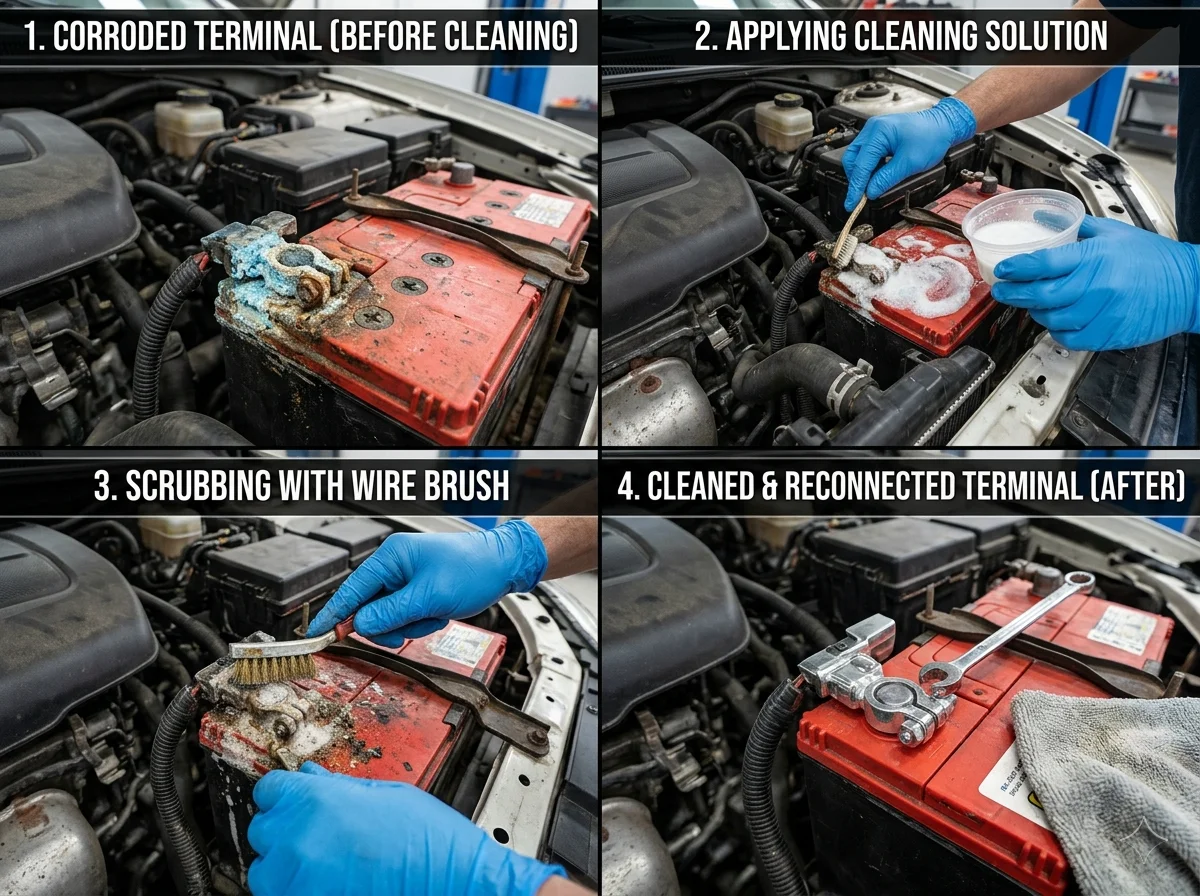
If your car cranks slowly, your headlights flicker at idle, or you pop the hood and see a crusty blue-green powder around the battery posts, you are looking at one of the most common (and most fixable) problems in any garage. Corroded battery terminals choke the flow of electricity between your battery and the rest of the vehicle, and they can mimic the symptoms of a dying battery, a bad alternator, or a failing starter.
The good news: cleaning car battery terminals is a 15-minute job you can do in your driveway with tools you probably already own. After years of seeing customers pay for new batteries they did not actually need, I want to walk you through doing it right, doing it safely, and keeping the corrosion from coming back.
What Causes Battery Terminal Corrosion?
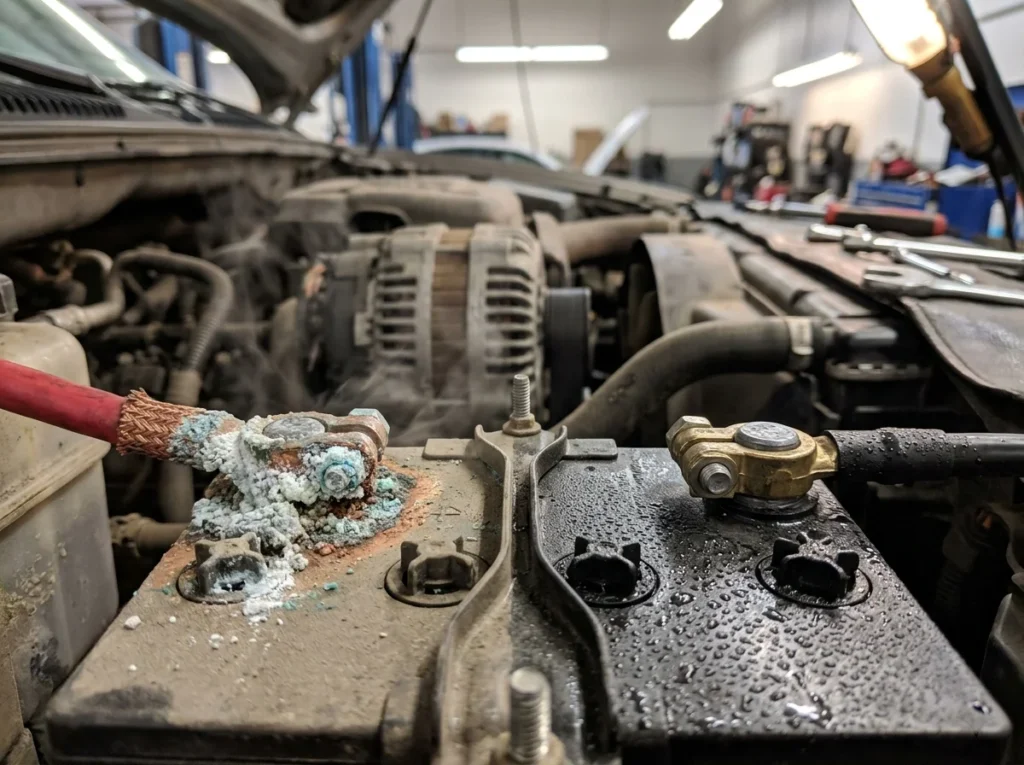
That fluffy white, blue, or green buildup on your battery posts is not just dirt. It is the result of a chemical reaction between the lead terminals, the sulfuric acid inside the battery, and the air around it. Hydrogen gas vents through the battery case over time, reacts with moisture and metals, and leaves behind sulfate deposits.
The color tells you something. White or grayish powder usually points to anhydrous copper sulfate, often on the negative terminal. A blue-green crust on the positive side typically means copper from the cable connector is reacting with battery acid. Either way, the deposit acts like an insulator, raising resistance and starving your starter of current.
| Cause | Effect on Your Vehicle |
|---|---|
| Hydrogen gas leaking from the battery | Powdery buildup on terminals, weak electrical contact |
| Overcharging by a faulty alternator | Excessive venting, faster corrosion, shortened battery life |
| Loose or worn cable clamps | Voltage drops, slow cranking, intermittent stalling |
| Old battery (4+ years) | Internal leakage, accelerated terminal corrosion |
| Humid climate or coastal air | Faster oxidation of exposed metal connections |
Also Read: How Often Should You Replace a Car Battery?
Tools You Will Need To Clean Car Battery Terminals
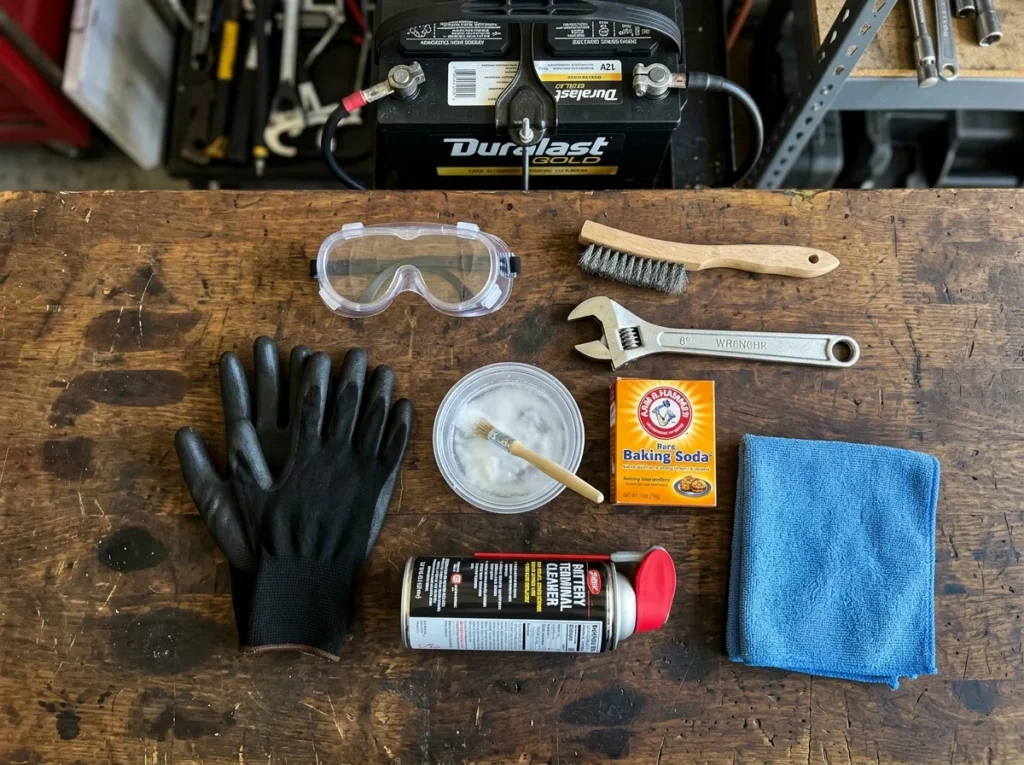
You do not need a professional shop to do this properly. Here is what actually works, and roughly what each item costs in the U.S. as of this writing.
| Tool / Material | Why You Need It | Approx. Cost (USD) |
|---|---|---|
| Adjustable wrench or 10mm socket | Loosens terminal clamps (most U.S. vehicles use 10mm) | $8 – $15 |
| Baking soda | Neutralizes acid in the corrosion | $2 |
| Old toothbrush or wire brush | Scrubs deposits off posts and clamps | $3 – $7 |
| Battery terminal cleaner tool | Cleans the inside of cable clamps thoroughly | $6 – $10 |
| Safety glasses and nitrile gloves | Protects eyes and skin from acid residue | $5 – $12 |
| Distilled water | Rinses without leaving mineral deposits | $1 – $2 |
| Petroleum jelly or terminal protectant spray | Seals clean terminals against future corrosion | $4 – $8 |
| Clean rag or shop towels | Drying and wiping | $3 |
Step-by-Step Guide to Cleaning Car Battery Terminals
Park on a level surface, turn the engine off, and let it cool for at least 10 minutes. Then work through these steps in order.
Step 1: Disconnect the Battery (Negative First)
Loosen the nut on the negative terminal (marked with a minus sign, usually with a black cable) and pull the cable off the post. Then do the same with the positive terminal (red cable, plus sign). Always disconnect negative first and reconnect it last. This prevents your wrench from accidentally grounding the positive terminal against the chassis and creating sparks.
Step 2: Inspect the Battery
Look at the case for cracks, swelling, or active leaking. If you see any of these, stop. A damaged battery should be replaced, not cleaned. Also check the cables for fraying or melted insulation near the clamps.
Step 3: Mix the Cleaning Solution
Stir one tablespoon of baking soda into one cup of warm water until it dissolves. This is the standard neutralizer for sulfuric acid residue, and it is what most professional shops use before pulling out anything stronger.
Step 4: Apply and Scrub
Dip your toothbrush or wire brush into the solution and scrub the terminals and the inside of the cable clamps. You will see fizzing, which means the baking soda is reacting with the acid. Keep scrubbing until the metal looks clean and dull-silver.
For stubborn buildup, use the battery terminal cleaner tool, which has a wire brush sized to fit both posts and clamps.
Step 5: Rinse and Dry
Pour a small amount of distilled water over the cleaned area to rinse off residue. Wipe everything completely dry with a clean rag. Moisture left behind will accelerate new corrosion almost immediately.
Step 6: Protect the Terminals
Apply a thin coat of petroleum jelly or a dedicated battery terminal protectant to the posts before reconnecting the cables. This creates a barrier against the air and moisture that cause oxidation.
Step 7: Reconnect (Positive First This Time)
Slide the positive cable onto its post and tighten the clamp. Then attach the negative cable. The clamps should be snug but not crushingly tight. If you can twist the clamp by hand, tighten it more. Start the engine to confirm everything works.
Battery corrosion can look simple, but sometimes your car still won’t start. MG Towing & Recovery offers 24/7 jump starts and roadside assistance. Get Emergency Help Now 414-973-1902
Safety Precautions You Should Not Skip
Important: Car batteries contain sulfuric acid and produce hydrogen gas, which is flammable. A small mistake can cause burns, eye damage, or in rare cases an explosion. The precautions below are not optional.
- Wear safety glasses and gloves. Acid splash on bare skin or in your eyes is the most common DIY injury here.
- No open flames, sparks, or smoking anywhere near the battery. Hydrogen ignites easily.
- Remove metal jewelry. Rings and watches that bridge a terminal and the chassis can heat up to burning temperatures in seconds.
- Never lean directly over the battery while connecting or disconnecting cables.
- Keep baking soda away from the battery cells. If your battery has removable caps, do not let solution drip inside. It will neutralize the electrolyte and ruin the battery.
Maintenance Tips to Prevent Future Corrosion
Cleaning is reactive. The real win is keeping corrosion from forming in the first place. A few habits will extend your battery’s usable life by a year or two.
- Inspect terminals every oil change, roughly every three to six months.
- Use anti-corrosion felt washers (the red and green fiber rings) under each clamp.
- Have your charging system tested annually. A good auto parts store will do it for free.
- Keep the top of the battery clean and dry. Wipe off any dust or moisture you spot.
- If your vehicle sits for long periods, use a quality battery maintainer to prevent deep discharge.
DIY vs Professional Cleaning
| Factor | DIY at Home | Professional Service |
|---|---|---|
| Cost | $10 – $25 in supplies | $25 – $75 labor |
| Time | 15 – 20 minutes | Drop-off; usually same day |
| Tools required | Basic hand tools | None on your end |
| Skill level | Beginner-friendly | Not applicable |
| Best for | Mild to moderate corrosion | Heavy buildup, damaged cables, or hybrid/EV vehicles |
For most gas-powered vehicles with light to moderate corrosion, DIY is the better call. For hybrids and EVs, leave it to a technician. Those high-voltage systems are not forgiving.
Common Mistakes to Avoid
- Disconnecting positive first. This is the single fastest way to short the system. Always negative first.
- Using too much water. Pouring solution into the battery cells will damage them.
- Skipping the protectant. Without grease or spray, corrosion can return within weeks.
- Overtightening clamps. Cracked terminals are not repairable. Snug, not gorilla-tight.
- Ignoring the cables. If green corrosion has crept up under the insulation, the cable itself needs replacement, not just cleaning.
- Cleaning a swollen or leaking battery. Replace it. No amount of scrubbing fixes internal failure.
Frequently Asked Questions
Q. How often should I clean my car battery terminals?
Inspect them every three to six months. Clean them whenever you see visible buildup, even if the car still starts normally. In coastal or humid regions, check more often.
Q. Can I use Coca-Cola to clean battery terminals?
It works in a pinch because of the phosphoric acid, but it leaves a sticky sugar residue that attracts dirt and accelerates new corrosion. Baking soda and water is safer, cleaner, and what professionals actually use.
Q. Do I need to disconnect the battery to clean the terminals?
Yes. Cleaning around live terminals risks shorts, sparks, and burns. Disconnecting also lets you clean the inside of the cable clamps, which is where most resistance hides.
Q. Will cleaning the terminals fix a car that will not start?
Sometimes. If corrosion is the cause, cleaning restores the connection immediately. If the battery is more than four or five years old, or if the problem returns within days, the battery itself is likely failing.
Q. Is white powder on car battery terminals dangerous?
It is corrosive and can irritate skin and eyes, but it is not immediately hazardous if you wear gloves and glasses. Wash your hands thoroughly after handling it and do not touch your face during the job.
Conclusion
Cleaning your car battery terminals is one of those rare maintenance tasks that costs almost nothing, takes very little time, and genuinely extends the life of expensive components. Done correctly, it can save you from a no-start morning, a tow bill, or an unnecessary battery replacement.
Work in the right order, wear your safety gear, and protect the terminals before you put the wrench away. If the corrosion keeps coming back after a thorough cleaning, that is your battery telling you it is near the end of its service life, and it is time to plan a replacement rather than fight the symptom again.
MG Towing & Recovery is always on standby, call anytime for immediate roadside help. Call Now for Immediate Assistance 414-973-1902